Teaching Aids
Two Web apps serve as teaching aids, which allows for comparing and contrasting different approaches:
- asynchronous programming vs. synchronous programming
- ES (event sourcing) vs. CRUD (create, read, update, delete)
- deployment on a Docker runtime vs. deployment on a Java runtime
- React-based GUI vs. Twirl-based GUI (with or without htmx)
- etc.
And the two teaching aids have a lot in common. Both show how to adopt the Ports & Adapters pattern and where the Model-View-Controller pattern as well as DDD’s patterns (still) fit in. Both result in Web applications that consist of one only deployment unit (which is reflected by there being only one Git/Docker🛈 repository each). Etc.
Building one teaching aid’s GUI with React (or one of its alternatives) and the other teaching aid’s GUI with Twirl (with or without htmx) might be overkill and a symptom of me not being certain anymore what the best approach is. For about a decade, using React & TypeScript for developing GUIs was a no-brainer to me and is still a great choice since both React and TypeScript are state-of-the-art pieces of technology that remain very popular (as the State of JavaScript survey keeps confirming) for many good reasons. Nevertheless, the discovery of htmx was somewhat of a revelation that even allowed for re-discovering Twirl (and for discovering JTE in the context of Spring Boot), while the increasing popularity but also complexity of React Server Components made me wonder whether template engines are not more straightforward if we are headed back to rendering on the server. Maybe we will end up blending the two approaches within one Web app.
Schedule like it’s 200X
One Web app that serves as a teaching aid is Twotle. Give it a try at https://twotle.com/ (and feel free to use it for actually fixing dates & times). Once you got an idea of what Twotle offers its users, head over to GitHub where its source code is published at https://github.com/Squoss/Twotle and download the project folder as a ZIP file.
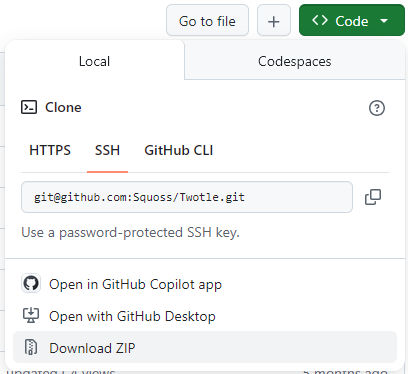
Extract the ZIP file, which results in a folder called Twotle-main.
Once you have revisited the Play requirements, with your shell, execute the commands sbt "run -Dconfig.file=conf/insecureLocalhost.conf" in Twotle-main/beapi and npm install followed by npm start in Twotle-main/fegui to run the apps locally; yes, during development, the API and the GUI are two separate apps. We will see how two become one during deployment. With your browser🛈, visit http://localhost:9000 and http://localhost:5173.
Share Secrets like it’s 1979
The other Web app that serves as a teaching aid is Deposplit.
to be continued …